
Admin panel features
Everything your staff, counsellors and managers need to run the consultancy: leads, follow-ups, students, applications, agents, invoices and reports, all in one admin panel.
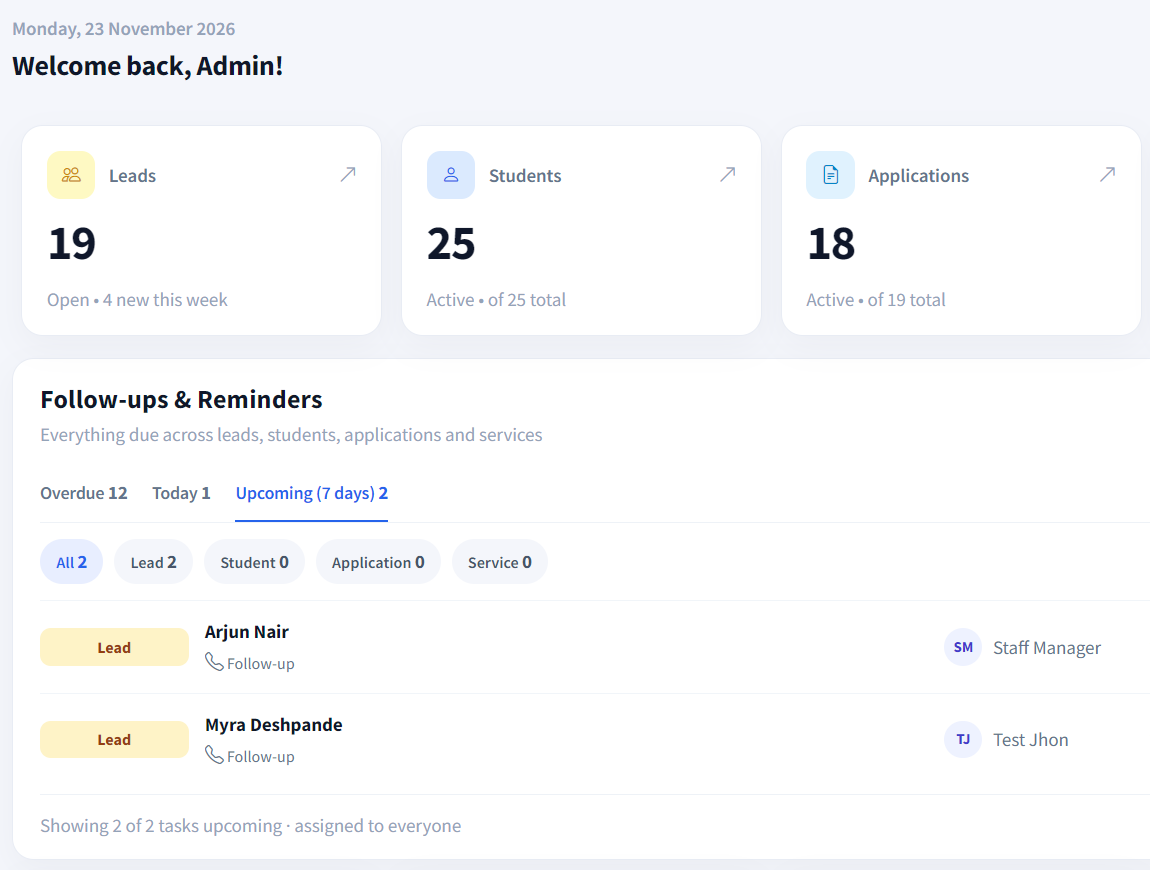
Every enquiry captured, every follow-up on time
See all your leads in one list with their status, owner and next follow-up, and know at a glance which ones need attention today.
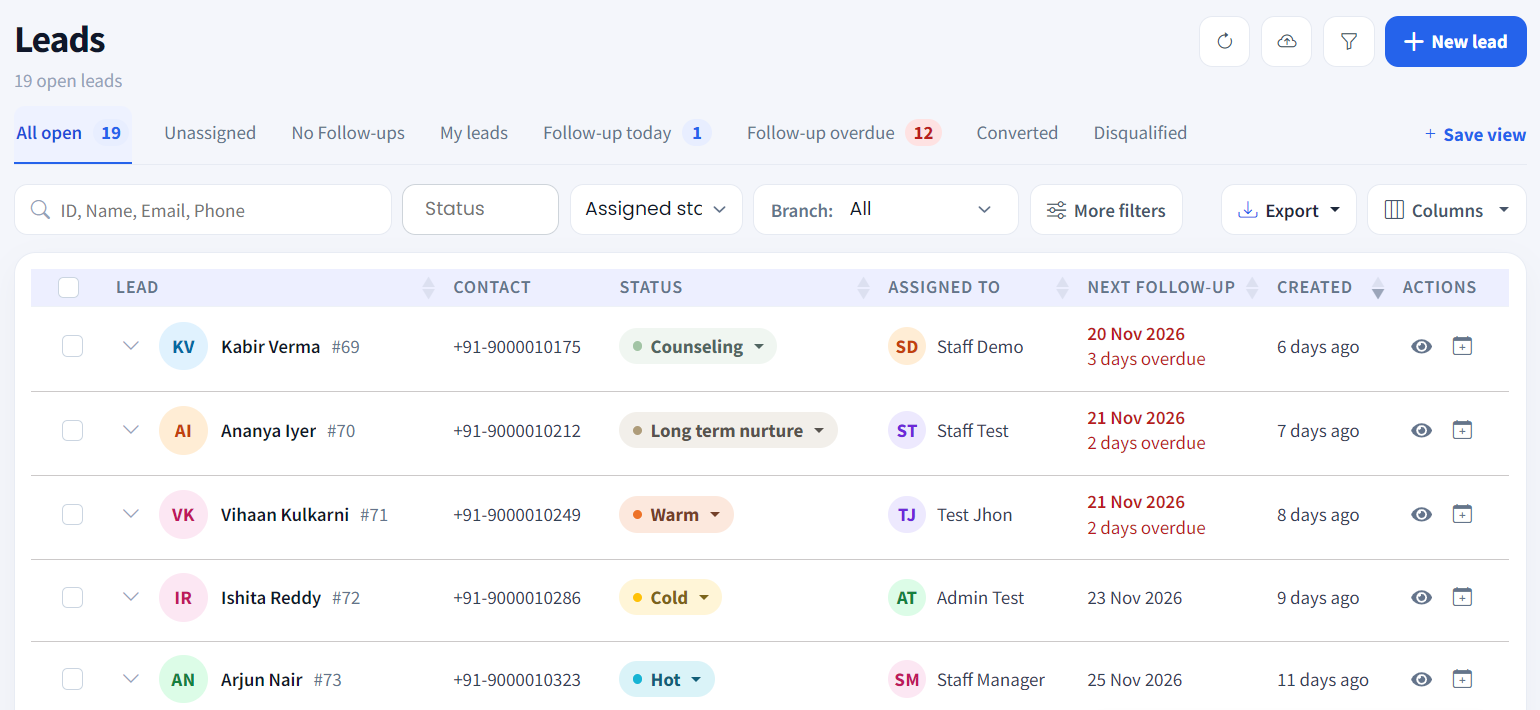
Leads from every source
Leads arrive automatically from web-to-lead forms, email-to-lead, Facebook lead ads and Google Sheets. Add them by hand or import a CSV file.
Ready-made and saved views
Switch between All open, Unassigned, No follow-ups, My leads, Follow-up today, Follow-up overdue, Converted and Disqualified, or save your own view.
Search, filter and export
Find a lead by ID, name, email or phone. Filter by status, staff member and branch, choose which columns to show and export the list.
Status and owner at a glance
Change a lead's status right from the list (Hot, Warm, Cold, Counselling, Long term nurture and your own values) and see who owns it.
Follow-ups that don't slip
Every lead shows its next follow-up date, overdue ones are highlighted in red, and staff get an email reminder when a follow-up is due.
Contact in one click
Email, SMS or WhatsApp a lead without leaving the CRM, or scan the QR code next to a number to dial it from your phone.
Counselling sessions
Assign a counsellor and a counselling date to qualified leads, assign leads to staff in bulk, and see every upcoming session by branch and country.
Convert to student
When a lead is ready, convert them to a student in one click. Their details, notes and follow-up history carry over.
Branch-wise leads
Each branch office works its own leads, while managers can switch between branches or see all of them together.
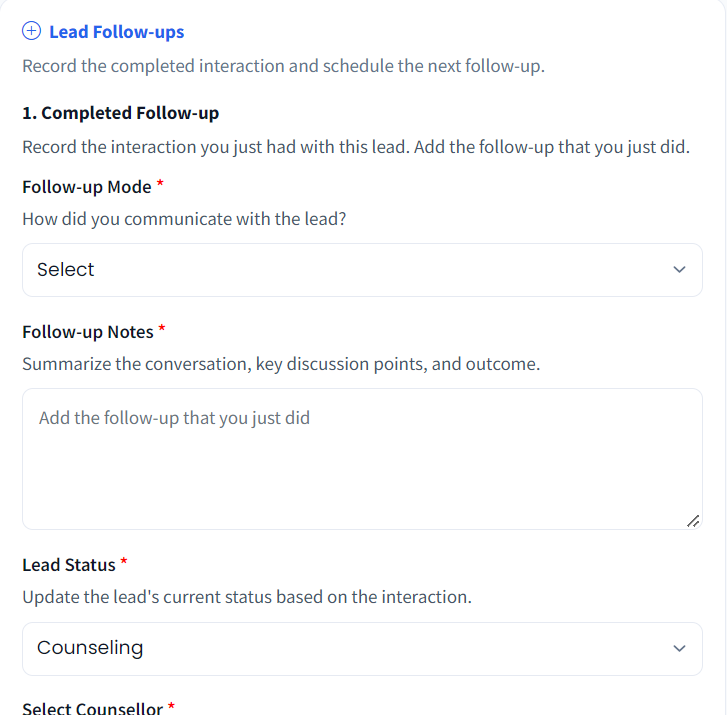
Log a follow-up and plan the next one in one step
After every call, message or meeting, staff record what happened and set what comes next, so the whole team knows where each lead stands.
- Record how you contacted the lead and what was discussed
- Update the lead status and assign a counsellor in the same step
- Schedule the next follow-up so the reminder is set automatically
- See the lead's contact details, notes and overdue warning alongside the form
- Convert the lead to a student with one click when they're ready
Every student, from first enquiry to admission
Converted leads become students with their full history. Track where each one is in the process and who is looking after them.
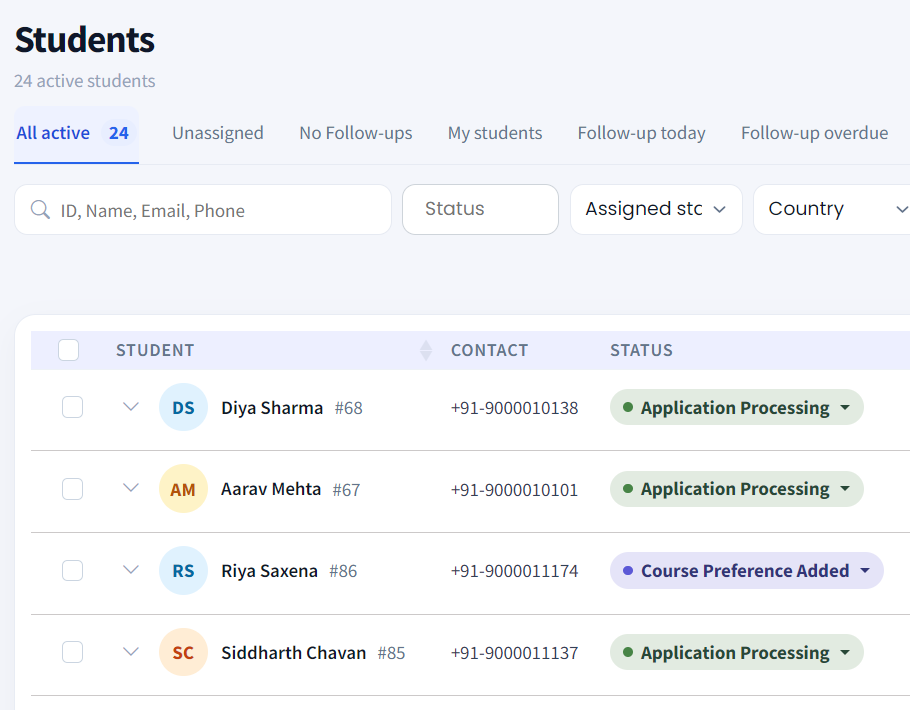
Find any student in seconds
The student list works the same way as leads, so your team already knows how to use it.
- Views for All active, Unassigned, No follow-ups, My students, Follow-up today and overdue
- Search by ID, name, email or phone, and filter by status, staff, country and branch
- Change a student's status and schedule a follow-up straight from the list
- Choose columns, export the list, and archive students you no longer work with
One page for everything about a student
The student's status, counsellor and contact options sit at the top, with a progress bar from Pending to Admission Complete. Everything else is one tab away.
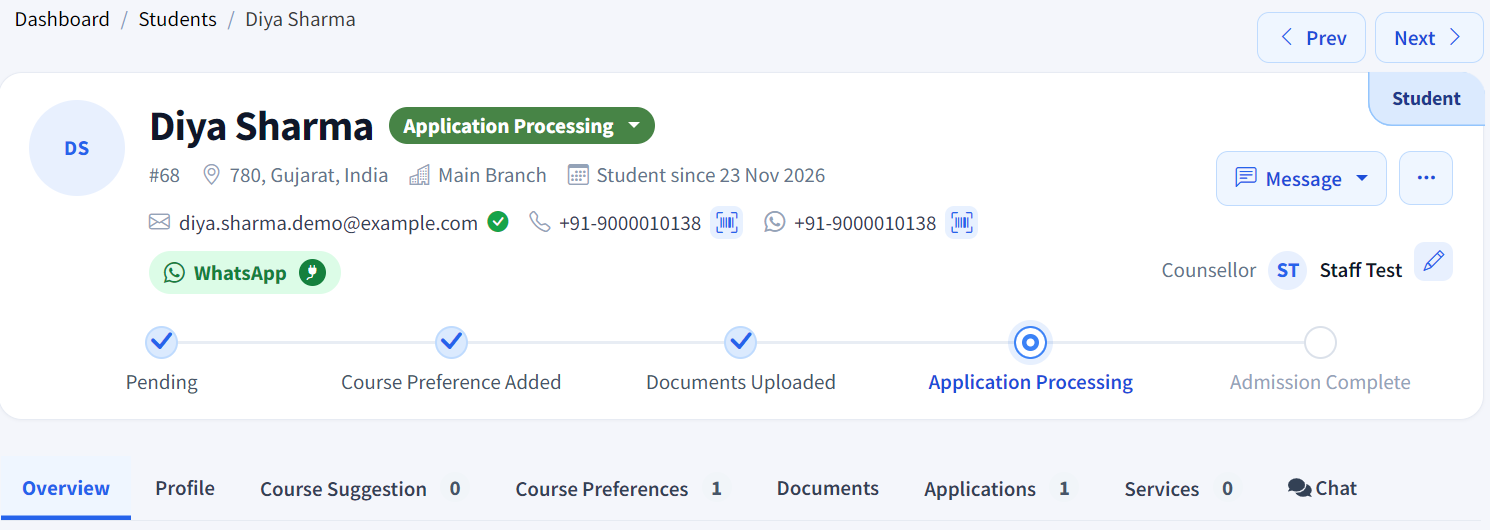
Overview
Profile completeness, the next follow-up, branch, agent and lead source, account status and last login, plus confidential notes only staff can see.
Profile
Personal details, study interests (level, destination, course, intake), academic background, English test scores and work experience.
Course suggestion
Send course suggestions to the student. They're notified and can add a suggestion to their preferences.
Course preferences
The universities and courses the student wants to apply to, ranked in order, added by the student or by staff.
Documents
Academic, language test and work experience documents uploaded by the student. View them one by one or download everything as a single zip.
Applications
Every university application for the student with its current stage. Open one to update its progress, add notes or message the student.
Services
Raise service requests such as visa, accommodation or loans for the student, link them to a university application, add an amount and notes, and follow each request's messages and activity.
Chat
A real-time conversation between the student and their assigned staff. See when the student is online, share files and know when your messages have been read.
Run every application from submission to visa
Each university application has its own page with its stage, documents, messages, deadlines and money, so nothing depends on someone's inbox or memory.
- Pending
- Documents ready
- Application fee paid
- Application submitted
- Offer letter received
- Visa complete
Default stages shown. Rename them or add your own in Settings.
Every application in one list
Switch between All, My applications and Unassigned, or save your own view. Filter by country, university, course, intake, staff, agent and branch.
Bulk actions
Select several applications to assign them to a staff member, change their status with a note, or delete them in one go.
Stage tracker and history
A progress bar shows where each application stands. Every status change is logged with its date, so you have a full activity history.
Students kept informed
Add a note when you change the stage and choose whether the student sees it. Students are notified about every update.
Messages with attachments
Message the student from inside the application using a template or your own text, attach files, and keep the whole conversation in one place.
Internal notes and tagging
Write notes the student never sees, and tag staff or agents so the right people are pulled in.
Document requests
Ask the student for a specific document, then view each upload or download them all as a zip. Mark the document checklist complete when everything is in.
Reminders and deadlines
Track opening and closing dates and the intake, add to-dos with deadline dates, and tick them off when they're done.
Fees and commission
Record university fee payments, the commission you expect and what you received, and the agent's commission for each application.
Close with a reason
Close finished applications as Completed, Admission rejected, Student withdrawn, Financial issue, No response or Duplicate, so reports show why.
Agents, automation, invoices and reports
The modules that save your team the most time once the basics are in place.
Agents and partners
Give partner agents their own panel and manage the whole relationship from yours.
- Agents register on your portal and add students, documents and course preferences
- Set commission rates and track each agent's referred students and applications
- Send agreements for e-signature and keep the signed history
- Share resources and announcements with all your agents
- Create commission invoices and record payouts
Automation
Keep leads and students engaged without sending every message by hand.
- Lead nurture workflows that send messages a set number of days after a lead arrives
- Target by lead status, source, campaign, destination country, course, study level or intake
- Scheduled campaigns for leads, students and agents at a chosen date and time
- Use your own templates and check the message history for each workflow
Invoices and commission
Bill students, universities and agents and know what is still due.
- Student invoices with tax, discounts, full or partial payments and PDF download
- Ad hoc invoices for one-off services
- University commission invoices for one or many enrolled students
- Agent commission invoices and payment records
Analytics and reports
See what is working across leads, staff, applications and agents.
- Leads by status, staff member and lead source, with conversions by staff
- Staff follow-up activity reports
- Applications by status and by staff member
- Agent referral and commission reports, plus sales charts
- Filter every report by date range or branch
Everything else your consultancy runs on
Applications, partners, messaging, invoices, content and team settings, all in the same admin panel.
Courses and referrals
Course finder
Search university courses by country, level and subject, then suggest a course to a student or add it to their preferences.
Course suggestion library
Build suggestion documents by country, education level and intake once, then share them with the right students instead of uploading them each time.
Student referrals
Every student gets a unique referral link. Track who referred whom and pay out referral rewards.
Communication and automation
Broadcast
Send email, SMS or WhatsApp messages to leads by status, or to students, agents and staff, in one go.
Notification templates
Edit the automatic emails, SMS and WhatsApp messages EduCtrl sends, and create your own templates for broadcasts.
Form builder
Pick the fields you need, then share the form link, embed it on any website or print it as a QR code. Every submission becomes a lead.
Webinars and events
Publish webinars and events that students see in their panel and can sign up for.
Content, shop and resources
Shop
Sell digital or physical products with categories, downloads, shipping options and order management.
Country information
Organise country guides and articles in folders, and make each one public, members only or private.
File sharing
Upload useful files, group them into categories and share a public link with students.
Pages (CMS)
Create pages for your website and add them to the main menu.
Multi-language student panel
Students can use their panel in English, French, Italian or Spanish.
Team, data and settings
Staff management
Add and manage staff members across all of your branch offices.
Roles and permissions
Create roles with exactly the permissions each job needs, then assign them to staff.
Import data
Import leads, students and university course data from CSV files.
Settings
Set your branding and contact details, turn modules on or off, and configure lead and student statuses, application stages, services, required documents, custom fields and messaging.
See the admin panel with your own workflow
Book a free demo and we'll walk you through leads, students and applications using your consultancy's process.